Over the last two years, the dream of many developers, A.K.A. the Steam store, got several sad stories of games that managed to get in.
Two of them are actually scaring me. These games are The War Z (now know as Infestation : Survivor stories), and very recently, Earth : Year 2066.
These games share the same problem : they got in steam, people got really pissed at them, and they got removed.
Both of these games got people angry for the same reasons : stolen copyrighted work, fake description on the store page, fake reviews and terrible customer service. (Earth : Year 2066 is accused of changing people's negative posts to positive posts).
Did they deserve getting banned ? Sure. On one hand, Steam shows that they care about their customers satisfaction and the quality of the products they're selling. But it scares me that a crowd of angry people have the possibility to stop a game from being sold, because I really hope they did deserve it, and they really were looking for easy money and making fun of their customers.
I am a bit naive. I want to make games for people to have fun, or, even better, to be amazed. I want to make money out of it because I want to live to make people laugh, cry, think or rage. I consider myself full of good will. I check if what I am downloading can be legally used in my game, I want to listen to critics, and I surely don't want to lie about what I'll sell.
But what if I was those developers ? What if there's a misunderstanding ?
I can reassure myself by seeing that don't want to do what these developers did, but I can't help but wonder "What if the developer was like me, a naive dreamer ? ".
To me, and probably many other developers out there, the Steam store is an El Dorado.
I mean, seven millions of curious people online daily, half of them checking the recent obscure games, quarter of them clicking on your game, an eighth of them waiting for a sale, and a small percentage actually buying the game. Do the math, that's still a lot of copies for an indie developer !
I don't want to get these people against me. I don't need it, and I don't want it.
Writing this reminds me of Phil Fish.
You are free to think what you want about the man, but FEZ was an incredible experience for me.
The depth of the universe, the sense of detail, the thoughts, the quality of the puzzles, the everything.
Someone couldn't make this game for money or fame only.
I consider him an artist. But, his temper and opinions got him in trouble.
The man was saying what he thinks, and, to be honest, if I ever spend 5 years of my life making a game that gets an IGF award, and somebody angrily tells me that I never released a video game, I would probably want to insult him too.
mardi 6 mai 2014

mardi 20 août 2013
Bastonnade : The first failure
Hello everyone ! Here's a quick note to talk about my latest game : Bastonnade, for the OUYA.

This game isn't good. It isn't terrible, or unfinished, but it has a lot of problems, and they mostly come from the same source : the Game Design.
When we started thinking about the game, we put on the table every single idea, wrote them down, during about a week. Then, we chose the good ones an struck out the bad ones.
And we were done. There has litteraly been no more game design for the game. If you can try the game (it is available for free) I suggest you do by wondering "What is fun in this game ? What did the developers do to make this level unique ?".
You'll quickly notice that the answer is always the same. And that's the problem, the game is more than repetitive, because we made the same level over and over with different assets.
Sure, there are some programming problems (a precise enemy tend to fall through the ground) and a bad difficulty flow (the first level is harder than the final boss) but it all comes up to the same problem.
We had a basic idea of what the game was about. We made a prototype and it was good. Not "good enough", it was really good. We had fun, it had everything we wanted. And we added levels, but that's it.
No new gameplay, no cutscenes, no originality.
The Game Design Document is a pain to do, but a game simply can NOT be done without it. It's like making a movie without a storyboard, or even a script !
You can have fun with the game, mostly with friends, but it won't feel different than the other games, and you'll quickly forget about it. What it misses is a soul.
Anyways, if you are playing the game, here's a tip : to unlock levels, you have to do certain special actions in the previous level.

This game isn't good. It isn't terrible, or unfinished, but it has a lot of problems, and they mostly come from the same source : the Game Design.
When we started thinking about the game, we put on the table every single idea, wrote them down, during about a week. Then, we chose the good ones an struck out the bad ones.
And we were done. There has litteraly been no more game design for the game. If you can try the game (it is available for free) I suggest you do by wondering "What is fun in this game ? What did the developers do to make this level unique ?".
You'll quickly notice that the answer is always the same. And that's the problem, the game is more than repetitive, because we made the same level over and over with different assets.
Sure, there are some programming problems (a precise enemy tend to fall through the ground) and a bad difficulty flow (the first level is harder than the final boss) but it all comes up to the same problem.
We had a basic idea of what the game was about. We made a prototype and it was good. Not "good enough", it was really good. We had fun, it had everything we wanted. And we added levels, but that's it.
No new gameplay, no cutscenes, no originality.
The Game Design Document is a pain to do, but a game simply can NOT be done without it. It's like making a movie without a storyboard, or even a script !
You can have fun with the game, mostly with friends, but it won't feel different than the other games, and you'll quickly forget about it. What it misses is a soul.
Anyways, if you are playing the game, here's a tip : to unlock levels, you have to do certain special actions in the previous level.
mardi 7 mai 2013
Personnal project : Level generator
Currently, I am trying a lot of rogue-like and rogue-inspired games.
These games most of the time offer a fresh gameplay when they are mostly based on generation.
I love random generation in games. They give the most surprises, force you to play some different ways and teach you to improvise. You can't know a generated game by heart.
The balance has to be good between what is generated, and what is always the same.
But there is one thing that seem to always please the player : level generation at runtime.
So I gave it a shot. My goal was a "as modulable as possible" generator for Unity.
I'm not giving the code this time, but I'm going to give an example, cons, and explain.
First, the example (in a 20x20 grid) :
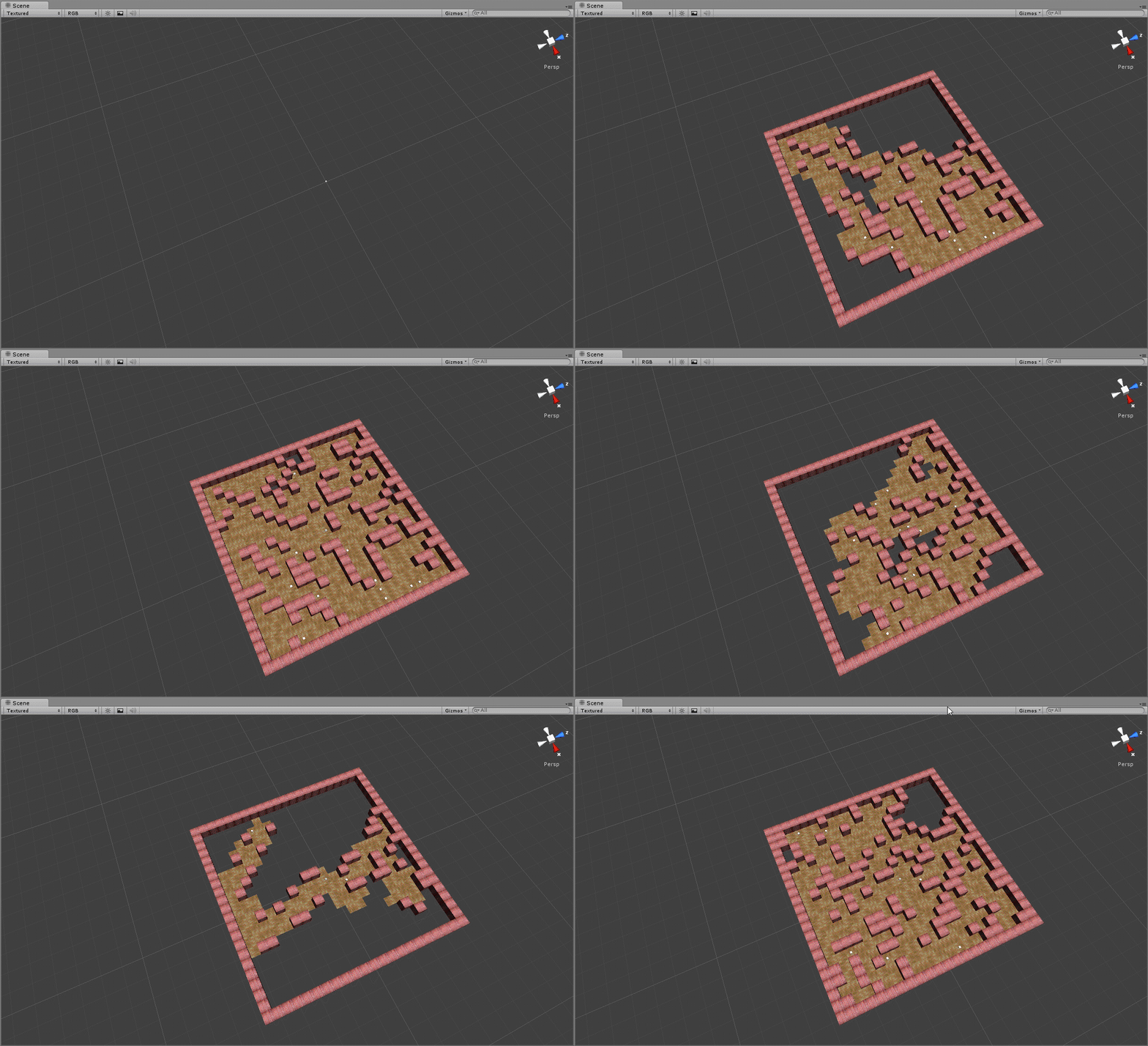
These levels are generated by using blocks either fully open (floor) or fully closed (wall)

How it works :
We have :
- a list of blocks that can be placed. Each block has a list of doors (can I go out by going north ? west ? east ? and south ?) and a probability to be picked.
- a grid of booleans to know if a position is used or not.
We pick a starting block that is placed at the center of the level.
Then, for each door this block has (north, west, east and/or south), we pick a new random block, and we rotate this block so the two doors are communicating.
Do this again for your new block, and do this again for your new new block, etc... until there are no new block needed.
Cons :
- It's slow. It takes about 30 seconds to generate a level in a 50x50 grid. So you must find a way to take this time from the player without him noticing.
- A block HAS to be squared, because of the rotation, a recangle shape will provoke empty spaces.
Pros :
- It can be used as a coroutine (as shown above) so you can generate the next level while the player plays the current level.
- You can put an element of a room or a full room in a block ; there is no size limit, so you can use prebuilt rooms instead of generating a labyrinth.
- Ease-of-use thanks to the editor.

With the first version of the editor, the user can easily change the probability of each block, and create new blocks.
What's next ?
Now that I'm writing this, I realize that some features could be added.
I could allow the user to disable the rotation of the blocks, so they can use rectangular blocks.
It would also be interesting to be able to add bigger blocks, that takes several places in the grid. So the user can used both prefab rooms AND generate labyrinths. (Half-way done here, I need to add the rotations)
It would be really interesting to add a third dimension to the levels generated.
jeudi 2 mai 2013
Low cost special effect : Shaking the camera
Ouya isn't powerful.
It's small, it's pretty, it's cheap, and it's very interesting for developers and curious players, but don't expect groundbreaking graphics compared to other consoles. That's not what it is for.
So, when you are afraid of using particles or shaders, you are looking for any low-cost effect possible.
My personnal favorite is shaking the camera.
It's easy, it's simple, and it just works.
So today, I'm offering you my own easy-to-implement camera shaker.
Just attach it to the camera, disable the script, and when you want to shake it, set magnitude, duration, and enable it.
Plus, it tries not to interfere with your camera controller !
It's small, it's pretty, it's cheap, and it's very interesting for developers and curious players, but don't expect groundbreaking graphics compared to other consoles. That's not what it is for.
So, when you are afraid of using particles or shaders, you are looking for any low-cost effect possible.
My personnal favorite is shaking the camera.
It's easy, it's simple, and it just works.
So today, I'm offering you my own easy-to-implement camera shaker.
Just attach it to the camera, disable the script, and when you want to shake it, set magnitude, duration, and enable it.
Plus, it tries not to interfere with your camera controller !
using UnityEngine;
using System.Collections;
[AddComponentMenu("Scripts/Camera/Shaker")]
public class Shaker : MonoBehaviour {
public float Magnitude;
public float Duration;
private float CurrentMagnitude;
private float startTime;
private Vector3 OriginalPosition;
private Vector2 ShakerVector=Vector2.one;
private float facteur;
// Update is called once per frame
void OnEnable()
{
startTime=Time.time;
CurrentMagnitude=Magnitude;
facteur=-Magnitude/Duration;
OriginalPosition=transform.position;
}
//Avant de lancer les prochaines updates
void OnPostRender()
{
transform.position=OriginalPosition;
if(CurrentMagnitude<=0)
{
enabled=false;
}
}
//after the camera controller has done its job
void LateUpdate()
{
CurrentMagnitude = facteur*(Time.time-startTime)+Magnitude;
OriginalPosition=transform.position;
transform.position+=new Vector3(ShakerVector.x*CurrentMagnitude*Random.Range(-1f,1.01f),ShakerVector.y*CurrentMagnitude*Random.Range(-1f,1.01f),0f);
}
public void Shake(float Magnitude,float Duration)
{
this.Magnitude = Magnitude;
this.Duration=Duration;
enabled=true;
}
}
mardi 5 février 2013
Unity Shader : Silhouette
While I was at the university, the most interesting course was the shaders. It was also the hardest.
To sum my opinion about shaders, I'd say they are as hard as they are rewarding.
Today, for the game we are currently developing, I had to go back to the shaders, but also, I had to learn a lot from the shader system Unity offers.
It's really good, but it's really confusing. Plus, the tutorials don't have a clear starting point, nor a clear end.
I found nearly the exact shader I needed here, but I wanted to learn today.
So, With the help of the shader showed above, I created a pass that draws a colored overlay Silhouette of the character.

And there you have it.
How it works
It's simple, really, yet I'm not sure I did it the right way.
It draws the silhouette whenever an object is overlapping (using the ZBuffer to determinate this) with a threshold of 3000 units.
Also, it doesn't change the Z-Buffer.
Hope It'll help !
To sum my opinion about shaders, I'd say they are as hard as they are rewarding.
Today, for the game we are currently developing, I had to go back to the shaders, but also, I had to learn a lot from the shader system Unity offers.
It's really good, but it's really confusing. Plus, the tutorials don't have a clear starting point, nor a clear end.
I found nearly the exact shader I needed here, but I wanted to learn today.
So, With the help of the shader showed above, I created a pass that draws a colored overlay Silhouette of the character.
Shader "Player/Silhouette" {
Properties
{
_MainTex ("Base (RGB)", 2D) = "white" {}
_BumpMap ("Normalmap", 2D) = "bump" {}
_SilhouetteColor ("Silhouette Color", Color) = (1,1,1,1)
}
SubShader {
Tags { "LightMode"="Always" "Queue" = "Transparent" }
LOD 250
//code dessinant la silhouette
Pass
{
Name "SILHOUETTE"
ZTest Greater
Offset 0 , -3000
cull back
ZWrite off
CGPROGRAM
#pragma fragment frag
#pragma vertex vert
#include "UnityCG.cginc"
float4 _SilhouetteColor;
struct v2f {
float4 pos : SV_POSITION;
};
v2f vert (appdata_base v)
{
v2f o;
o.pos = mul (UNITY_MATRIX_MVP, v.vertex);
return o;
}
half4 frag (v2f i) : COLOR
{
return _SilhouetteColor;
}
ENDCG
}
}
FallBack "Mobile/Diffuse"
}
To use it, add
usepass "Player/Silhouette/SILHOUETTE"Before your shader, and add the property :
_SilhouetteColor ("Silhouette Color", Color) = (1,1,1,1)
And there you have it.
How it works
It's simple, really, yet I'm not sure I did it the right way.
It draws the silhouette whenever an object is overlapping (using the ZBuffer to determinate this) with a threshold of 3000 units.
Also, it doesn't change the Z-Buffer.
Hope It'll help !
vendredi 4 janvier 2013
OUYA : I have yet a lot to learn.
My "company" received the developers' OUYA yesterday. If you don't know about OUYA, you'll easily find a lot of articles about that console. If you read them, please, keep in mind that Minecraft is the most played game on the xbox 360.
So, after realizing our game looked bad after looking at Hawken, we plugged the OUYA to the TV and started goofing around.
After a nice, encouraging message, we got to the UI. It's not finished, they are still working on it, but it's promising !
Anyways, I'm not here to really talk about OUYA, more to talk about the unique experience I'm having with it.
A big difference between indies and professional developers is the platform.
Except with XNA on XBLAI, it's hard for an indie developer to make a game for console. It's way easier to publish on PC with sites like Desura or Steam, or on smartphones, because there, people are used to go on the internet to get their games. (How many people have I seen that never even looked at the fabulous games on XBLA ? I bought my xbox only for this !)
Android publishing costs 25 $ (if you decide to publish on the play store) and for the iPhone, it's around 99 bucks per year (I'm not sure about that, never got to the end of publishing an iPhone game, and they make sure you don't really know how much you're about to spend).
So, like a lot of indie developer, I had only a few ideas about "what a dev console is like".
And boy, even if I knew what was coming, having a console without any games available feels really weird ! An empty UI, an USB cable to plug into your computer, the console sitting right next to you, controlled by the PC.
That's a hundred mile away from buying a console with some games with it. You almost don't care what the UI looks like, or if you plugged everything right.
tldr :
"It works ? Let's play some games!" feels so different than "It works ? Yes ? You're sure ? I don't... it's... yes, it... well, let's make a test game to try it."
but I like both.
So, after realizing our game looked bad after looking at Hawken, we plugged the OUYA to the TV and started goofing around.
After a nice, encouraging message, we got to the UI. It's not finished, they are still working on it, but it's promising !
Anyways, I'm not here to really talk about OUYA, more to talk about the unique experience I'm having with it.
A big difference between indies and professional developers is the platform.
Except with XNA on XBLAI, it's hard for an indie developer to make a game for console. It's way easier to publish on PC with sites like Desura or Steam, or on smartphones, because there, people are used to go on the internet to get their games. (How many people have I seen that never even looked at the fabulous games on XBLA ? I bought my xbox only for this !)
Android publishing costs 25 $ (if you decide to publish on the play store) and for the iPhone, it's around 99 bucks per year (I'm not sure about that, never got to the end of publishing an iPhone game, and they make sure you don't really know how much you're about to spend).
So, like a lot of indie developer, I had only a few ideas about "what a dev console is like".
And boy, even if I knew what was coming, having a console without any games available feels really weird ! An empty UI, an USB cable to plug into your computer, the console sitting right next to you, controlled by the PC.
That's a hundred mile away from buying a console with some games with it. You almost don't care what the UI looks like, or if you plugged everything right.
tldr :
"It works ? Let's play some games!" feels so different than "It works ? Yes ? You're sure ? I don't... it's... yes, it... well, let's make a test game to try it."
but I like both.
lundi 3 décembre 2012
Why the Wii U can (but probably won't) create new gameplays.
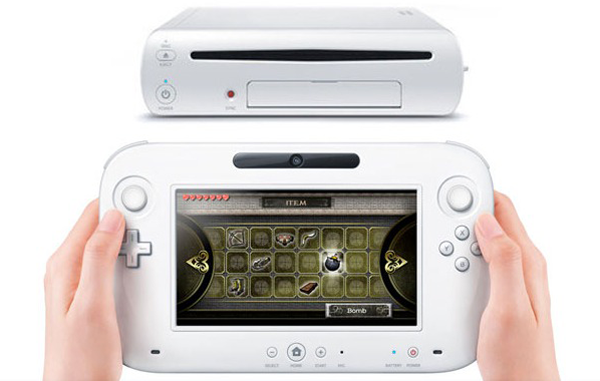
Recently, the Wii U was released in Europe, and sooner in the US. Another Nintendo console with its Zelda Metroid Mario games, with yet another goofy controller, the Gamepad.
It's a bad tablet (monotouch), it's a bad controller (have you seen the size of it?!), the pro controller is a rip-off of the (perfect in my opinion) xbox 360 controller. And the specs. Oh, the specs ! It's so lame, so slow !
Well, it's gonna be another Nintendo console, right ?
Right ?
No !
A few days after the release in US, I started thinking about it for real.
The specs : I don't give a damn about it. We are currently playing with a 6 years-old PS3 and a 7 years-old xbox 360, and people still think they're powerful. When their successor will be out, a new generation of graphics will appear. A generation that's already ready, for quite a moment.
But I'm not here to talk about why or if the Wii U is a good system, I want to talk about the opportunities that the system can offer.
Nintendo consoles have always been better at local multiplayer, they are designed for that. But the Wii U can go one step further.
It can offer different gameplays.
As you have probably already seen, the gamepad can be used in platformers to create platforms.
- Hey, guys ! Can I play ?
- Eeeer... We're already four...
- Here ! you can have the gamepad, and touch, from time to time, if you feel like it.
But we've also seen NintendoLand, that shows not only the power of the console, but the opportunities gamedesigners should take.
Different gameplay for different players.
Why make a balanced game ?
In Mario Party, the rare moments when you have fun are the 3vs1 games.
In Saints Row, you can play a Golf car versus a tank. When the tank killed the golf car (it's not likely to be the opposite), the players switch, and there it is, it is balanced, because each player had the tank.
So why keeping your game balanced, if you can switch the balance ?
"Okay, but this works for short games or casual themes"
Not neccesarily;
Natural Selection and Nuclear Dawn both have 2 gameplays : a STR gameplay, and a FPS gameplay. The player can become a commander or a soldier.
On a tablet, the player can see both screens, and holds the whole system in its hands : he is bigger than the console, he can carry it, shake it, throw it. He's more powerful than the system.
The gamepad players however, only have one screen, heavy and big, lots of wires, it's bigger than them, and carrying, shaking, throwing the system would be a real effort. They are weaker than the system.
These two players can now easily meet thanks to the wii U. A god vs soldiers. Or is it a god helping soldiers ? or a god helping farmers ? Or a farmer, taking care of its sheeps ? or a wolf who wants to eat the sheeps ?
let's throw a random game idea :
the gamepad players are in first person, and are stuck in a labyrinth
the tablet is in an above view, and can move the walls
You now have developped a small vision of the game in your head. But now, you might be wondering : "is it cooperative gameplay, or competitive?". It's compatible with both.
about multiplayer with different gameplay, the Wii U could be what I was waiting for. Let's now see if I was right, or if we'll be playing Zelda with he inventory showing the scores on the table.
Inscription à :
Articles (Atom)